
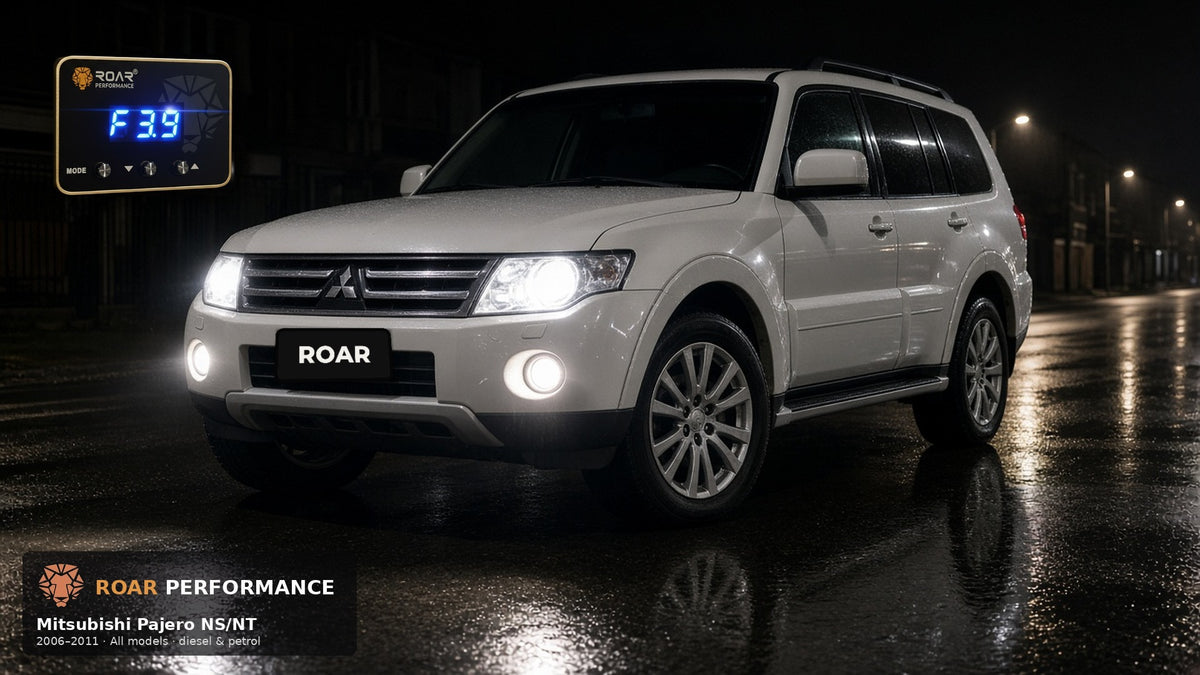


Mitsubishi Pajero NS/NT Throttle Controller (2006–2011)
Roar 4X4
✓ Confirmed Compatible — Plug Type: 609Free shipping on throttle controllers.
- AI Learning
- 6 modes × 9 levels
- Plug & play
- Plug 609
✓ Australian Owned & Operated
YES IT FITS — Mitsubishi Pajero NS/NT Throttle Controller (2006–2011)· Plug 609
Features
- AI Learning
- 6 driving modes × 9 sensitivity levels
- Plug & play — no ECU flash
- Overtake / anti-theft modes
- Day/night auto-dim display
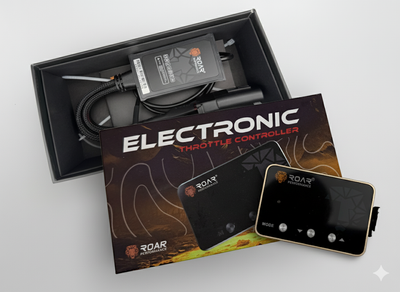
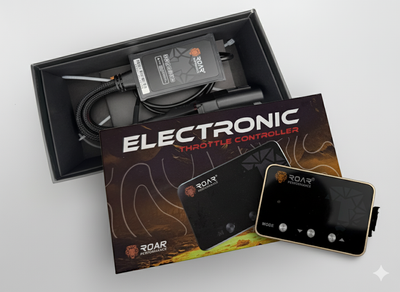
What’s in the box
- Throttle controller unit
- Vehicle loom(plug 609)
- Dash mount
- Instructions
Mitsubishi Pajero NS/NT Throttle Controller (2006–2011) — Roar 4X4
Is this your Mitsubishi Pajero NS/NT (2006–2011)?
Mitsubishi Pajero NS/NT, 2006–2011. The NS/NT face is the squarer 2006 face: a grille with three chrome horizontal bars, and a body-colour bumper without a chrome lower strip. On sale in Australia from October 2006.
- Band: Mitsubishi Pajero NS/NT, 2006–2011 only.
- AU fuel: Not confirmed for the whole NS/NT 2006–2011 band. The NS launch (October 2006) was offered with a 3.2 DI-D diesel and a 3.8 V6 petrol (NextCar, 3 October 2006). Whether petrol continued through every NT year to 2011 is not confirmed on this page.
- Plug: Plug Type 609, confirmed for this Mitsubishi Pajero NS/NT (2006–2011) page. Match the connector in the picture before you install.
Not this page: Pajero NM/NP (2000–2006) and Pajero NW/NX (2011–2021) are different bands.
Unlock the full potential of your Mitsubishi Pajero NS/NT (2006–2011) with the Roar 4X4 Performance Throttle Controller. Eliminate throttle lag, improve acceleration response, and enjoy a smoother, more responsive drive with this advanced plug-and-play unit. Designed for touring, towing and off-road driving, this controller transforms how your Pajero NS/NT responds.
Product Specifications
| Brand | Roar 4X4 |
| Suits | Mitsubishi Pajero NS/NT (2006–2011) |
| Type | Performance Throttle Controller |
| Plug Type | 609 |
| Installation | Plug & Play — No Wiring Required |
| Install Time | 10–15 Minutes |
| Driving Modes | 6 Modes + 9 Sensitivity Levels |
| Warranty | Roar 4X4 Manufacturer Warranty |
Vehicle Compatibility — Does This Fit My Pajero NS/NT?
| Make | Model | Year Range | Plug Type | Compatible |
|---|---|---|---|---|
| Mitsubishi | Pajero NS/NT | 2006–2011 | 609 | ✅ YES — IT FITS |
This page covers Mitsubishi Pajero NS/NT 2006–2011 only. Check the compatibility table above to confirm this throttle controller fits your exact vehicle. Not listed? Contact our team or use our Vehicle Compatibility Finder.
Key Features
- ✅ Eliminates Throttle Lag — Instant throttle response for smoother, faster acceleration
- ✅ 6 Driving Modes — Economy, Off, Comfort, Sport, Race, and Auto to suit any driving condition
- ✅ 9 Sensitivity Levels — Fine-tune throttle response to your exact preference
- ✅ AI Learning Mode — Adapts to your driving style over time for optimal performance
- ✅ Anti-Theft Security Mode — Reduces throttle input to prevent unauthorised vehicle use
- ✅ Day/Night Sensor — Auto-brightness control for safe, glare-free viewing
- ✅ Transmission Settings — Manual (HHH) or Auto (AAA) modes for precise control
- ✅ Instant Overtake Boost — Long-press M button to jump into Race Mode for immediate passing power
- ✅ Fuel-Saving Economy Mode — Optimises throttle delivery to reduce fuel consumption on long highway trips
- ✅ 100% Plug & Play — No cutting, no splicing, no tools required. Plug Type 609 pre-matched for your Pajero NS/NT
Why Fit a Throttle Controller to Your Mitsubishi Pajero NS/NT?
Modern drive-by-wire vehicles like the Mitsubishi Pajero NS/NT use electronic throttle control, which introduces a factory-programmed delay between pressing the accelerator and engine response. This "throttle lag" is most noticeable when merging, overtaking, towing, or driving off-road.
The Roar 4X4 Throttle Controller remaps the throttle signal to deliver your engine's existing power faster. It doesn't increase horsepower or torque — it eliminates the delay so you feel the power sooner. Sport and Race modes provide sharper response for overtaking, towing and off-road driving, while Economy mode softens throttle delivery to improve fuel efficiency on long highway trips.
What's in the Box
- ✅ Roar 4X4 Performance Throttle Controller Unit — With LCD display
- ✅ Vehicle-Specific Wiring Harness — Plug Type 609 for Mitsubishi Pajero NS/NT (2006–2011)
- ✅ Mounting Bracket & Adhesive Pad — For dashboard mounting
- ✅ Fitting Instructions — Universal installation guide
Confirm your plug — please check your plug type as per the picture
Before you install, match the plug-face photo in the gallery to the connector on your accelerator pedal. Pin layout, housing shape, and lock colour must match. Then download the installation instructions for verification. If you are unsure, contact support with a clear photo of your plug before ordering.

- Please check your plug type as per the picture before install.
- Unplug the pedal connector and compare pin layout / housing / lock colour.
- Download installation instructions for verification: TC instruction manual (PDF).
- If it does not match, or you are unsure, contact support with a clear photo of your plug.
Fitting Instructions — Throttle Controller Installation
🔧 Universal Plug & Play Installation — 10 to 15 minutes, no tools required.
- Locate Throttle Pedal: Find the electronic connector on your Pajero NS/NT's accelerator pedal — it's the plug at the top of the pedal.
- Plug In Controller: Disconnect the factory connector. Plug the Roar controller (Plug 609) between the pedal and factory harness.
- Mount & Drive: Secure the display on your dashboard. Start your Pajero NS/NT and select your preferred driving mode. Done!
Installation is the same for all vehicles — simply match the plug type to your accelerator pedal connector. No cutting, splicing, or tools required. Fully reversible — remove anytime to return to factory settings.
Frequently Asked Questions — Mitsubishi Pajero NS/NT Throttle Controller
Will this throttle controller void my warranty?
No. The Roar 4X4 Throttle Controller is a plug-and-play device that does not modify your ECU, engine mapping, or any permanent wiring. It can be removed in under 2 minutes, returning your Pajero NS/NT to 100% factory settings with no trace of installation.
Does it increase power or just throttle response?
The throttle controller adjusts how quickly your Pajero NS/NT's existing power is delivered — it does not increase horsepower or torque. It remaps the throttle signal so you feel the power sooner, eliminating the factory-programmed delay.
Can I use it while towing with my Pajero NS/NT?
Absolutely. Many owners use Sport or Race mode while towing to get better response when merging, overtaking, or climbing hills. Economy mode is great for long-distance touring to reduce fuel consumption.
Is it compatible with aftermarket ECU tunes or chips?
Yes. The throttle controller works independently of ECU tunes, performance chips, or exhaust modifications. It complements these upgrades by giving you finer control over throttle delivery.
What does Anti-Theft Mode do?
Anti-Theft Mode dramatically reduces throttle input, making the vehicle very difficult to drive. This provides an additional layer of security against unauthorised use of your Pajero NS/NT.
Shipping & Returns
📦 Shipping: Free shipping on throttle controllers within Australia. In-stock items typically dispatch within 2–3 business days. Allow 2–14 business days in transit depending on location. Australia only — we do not ship to P.O. boxes. Shipping for other products is calculated at checkout.
↩️ Returns & Warranty: Covered by our manufacturer warranty and your rights under Australian Consumer Law. If an item arrives damaged, faulty or incorrect, email admin@roar4x4.com within 30 days of delivery with your order number and photos — do not post it back until we say where. We do not accept change-of-mind returns. Return shipping is on us when we confirm a fault or our error. Full details: Refund policy.
Fitting Instructions — Mitsubishi Pajero NS/NT Throttle Controller (2006–2011)
Locate Throttle Pedal
Find the electronic connector on your accelerator pedal in the driver's footwell. It's the plug going into the top of the pedal.
Disconnect Factory Plug
Unplug the factory connector from the throttle pedal sensor. Press the release tab and pull gently.
Plug In Controller
Connect the Roar controller harness between the pedal sensor and the factory connector. It goes inline.
Route Display Cable
Route the display unit cable neatly along the centre console or dashboard to your preferred mounting location.
Mount Display Unit
Secure the display unit on your dashboard using the supplied adhesive mount. Choose a visible, accessible spot.
Start & Select Mode
Start your vehicle. The controller powers on automatically. Select your preferred driving mode and sensitivity level.
Estimated install time: 10-15 minutes · No tools required · 100% plug and play
Contact us with your vehicle details and we'll confirm compatibility.
 Mitsubishi Pajero NS/NT Throttle Contro...
$229.00 VIP $169
Mitsubishi Pajero NS/NT Throttle Contro...
$229.00 VIP $169